
The ERP migration was supposed to take nine months. Eighteen months later, the combined company was still running two general ledgers. The CFO was manually reconciling revenue numbers in Excel every month-end. The help desks—three of them, because nobody had consolidated the legacy environments—couldn’t even forward a ticket to each other. And the TSA extension? $180,000 a month, every month, with no exit date in sight.
Start with the part most integration guides skip. Before you can plan a post-merger IT integration, you need an honest answer to a harder question: can this organisation actually execute it? Two buyers can acquire the same company, sign the same TSA, and hire the same advisers, and one produces a working estate in fourteen months while the other is still reconciling ledgers in year three. The difference is not the playbook. It is whether the capability to run the playbook was underwritten before ownership transferred. That is the test this guide is built around.
This isn’t a hypothetical. It’s a real mid-market carve-out—one of hundreds where the deal’s original synergy case was buried under unreconciled data, incompatible identity systems, and a technology separation plan that looked bulletproof in a PowerPoint and fell apart the moment it met reality. The uncomfortable truth: most IT integrations fail quietly. They don’t make headlines like a collapsed deal. They bleed value slowly—an extra quarter here, a missed synergy target there, a frustrated management team that loses faith. By the time anyone quantifies the damage, the IRR has already slipped by triple-digit basis points.
Here’s what the data says:
- 70% of mergers fail to achieve their anticipated revenue synergies, with IT integration delays identified as the primary culprit in more than half of those cases (McKinsey M&A Research Programme)
- IT-related delays alone cost the average $500M+ deal between $15M and $30M in unrealised synergies per year (BCG 2024 M&A Report)
- IT integration consumes 25–40% of total integration costs—more than any other single workstream (Deloitte M&A Benchmarking)
- 60% of companies report significant business disruption during the first 12 months of IT integration (Gartner CIO Survey)
- Carve-out transactions underperform their investment thesis by an average of 340 basis points in IRR when IT separation exceeds 18 months (Journal of Private Equity, 2023 study of 85 PE carve-out transactions)
For private equity investors executing carve-outs, the stakes are sharper. You’re not combining two systems—you’re surgically extracting one from another under a ticking TSA clock that costs real money every month the separation drags on. In PE, 340bps is the difference between a fund that raises its next vehicle and one that doesn’t.
This guide is built to prevent that outcome. But it makes one conceptual shift that most integration content misses: the question is not “how do we integrate,” but “can we actually execute this integration, and how do we underwrite that before we own the asset?” That distinction, between execution planning and execution-risk underwriting, is where deal value is won or lost.
It walks through the complete post-merger IT integration lifecycle—from pre-close planning through steady-state operations—with specific frameworks, timelines, cost benchmarks, and a downloadable checklist for PE sponsors and corporate acquirers. Crucially, it shows how to turn those plans into underwriting confidence before signing: validating integration complexity during diligence, reducing execution risk before ownership transfers, and turning execution into measurable outcomes.
For a downloadable, phase-by-phase version of the plan below, see the companion post-merger IT integration checklist. Where the separation runs under a temporary services arrangement, pair it with our guide to TSAs in M&A.
Why Most Post-Merger IT Integrations Fail (and What It Costs You)
The first step to avoiding IT integration failure is understanding what causes it. Despite huge differences across industries and deal sizes, the failure patterns are remarkably consistent.
The Five Failure Patterns That Repeat in Every Deal
1. IT is treated as a post-close problem. Technology integration planning routinely starts after the deal closes instead of during due diligence. The IT team inherits decisions made without their input—on system architecture, data migration scope, and integration timelines—that are difficult or impossible to reverse. According to Accenture, only one in four CEOs report conducting technology due diligence for most of their deals, despite 74% saying technology is a growth enabler or source of competitive advantage. The gap between perception and practice is where integration failures begin.
2. The “just migrate” fallacy. Leadership frequently assumes that data migration equals integration. It doesn’t. Data can be exported and imported, but business logic—the pricing rules, approval workflows, catalogue taxonomies, and partner configurations that make a platform operational—cannot be copy-pasted between systems. It must be rebuilt, reconciled, or redesigned. None of which anyone budgeted for.
3. Underestimating complexity at close. M&A due diligence focuses on financials and legal. Technology receives a passing glance. Customisations, technical debt, and integration dependencies surface only after closing—often during Day 1 stabilisation, when there is no capacity to deal with them properly.
4. Talent drains during the transition window. The employees who understand the legacy platform—its customisations, data model, undocumented business rules—are the most likely to leave during the uncertainty of an integration. When they go, institutional knowledge walks out the door, and the integration team must reverse-engineer systems externally just when velocity counts most.
5. Integration fatigue. The same IT team managing the integration is simultaneously running the business, managing infrastructure consolidation, handling security harmonisation, aligning HR systems, and coordinating ERP rationalisation. The workstream that consistently gets deprioritised is whatever feels least urgent—until customers notice and revenue drops.
The Compounding Cost of Getting IT Integration Wrong
These failure patterns don’t exist in isolation. They compound in a predictable chain:
- IT sidelined during due diligence → integration unplanned at close
- No plan → reactive decisions under deadline pressure
- Reactive decisions → customisation debt overlooked entirely
- Unaddressed debt → timelines stretch 12–18 months
- Extended timelines → the synergies integration was supposed to deliver never materialise
What makes these failures particularly dangerous is that they’re invisible until they reach a tipping point. Early in the integration, small inconsistencies—duplicate customer records, slightly misaligned pricing logic, parallel workflows—seem manageable. Teams compensate manually. Leadership assumes the integration is progressing.
But over time, these inconsistencies accumulate into systemic friction: reporting becomes unreliable, customer experience diverges across channels, and operational teams begin building workarounds outside official systems. At that stage, the organisation is no longer integrating—it is operating two businesses under the illusion of one. The remediation effort at that point is significantly more expensive than addressing root causes earlier in the lifecycle.
A decision deferred from pre-close to post-close can cost 3–5x more to implement once systems are live and business continuity becomes a constraint. (McKinsey M&A Integration Research)
The IT Integration Landscape: Why IT Is Not Just Another Workstream
Non-technical deal teams often underestimate IT integration because they think of it as a plumbing exercise: connect the networks, migrate the email, done. In reality, IT integration touches every dimension of the business simultaneously.
The Five Layers of IT Integration
| Layer | What’s Involved | Typical Complexity |
|---|---|---|
| Infrastructure | Networks, data centres, cloud environments, endpoints | Medium |
| Applications | ERP, CRM, HRIS, financial systems, proprietary tools | High |
| Data | Customer records, transaction history, analytics, IP | Very High |
| Security | Identity management, access controls, compliance frameworks | Very High |
| People & Processes | IT teams, support structures, ITIL workflows, governance | Medium-High |
Each layer interacts with the others. Change your identity management system (Security) and you affect every application login (Applications), which in turn affects how people do their jobs (People) and how compliance audits run (Processes). This interconnectedness is what makes IT integration exponentially harder than it first appears.
The Four Integration Archetypes
The nature of your IT integration depends entirely on the deal structure:
1. Absorption (Full Integration). The target’s IT estate is fully absorbed into the acquirer’s environment. Common in bolt-on acquisitions where the acquirer’s systems are clearly superior. Challenge: migrating data and users without business disruption.
2. Preservation (Standalone). The target operates independently. Common when the acquisition is a new platform investment or when integration creates more risk than value. Challenge: maintaining governance and reporting without creating silos.
3. Symbiosis (Best of Both). Select systems are integrated, others remain separate. The most common—and most complex—archetype. Challenge: deciding what to integrate vs. keep separate, managing hybrid environments over extended periods.
4. Carve-Out (Separation-First). The target’s IT must be separated from a parent company’s shared environment. The defining challenge of PE carve-outs. Challenge: everything is harder when you’re extracting, not combining.
The Carve-Out Complexity Multiplier: Why PE Deals Are 3x–5x Harder
If you’re a PE investor reading this, you’re almost certainly dealing with a carve-out. Carve-out IT integrations carry a 3–5x complexity multiplier over standard M&A IT integration:
- Shared everything: The target’s ERP, Active Directory, network, data centres, and support teams are typically shared with the parent. You can’t just take your share—you need to build a standalone copy from scratch.
- The TSA clock: Every carve-out operates under a Transitional Service Agreement (TSA): a temporary arrangement where the seller continues providing IT services. TSAs typically run 6–24 months and cost the buyer a negotiated fee (usually cost-plus). Every month of delay burns both cash and seller goodwill.
- Incomplete information: Sellers rarely maintain a clean inventory of what’s shared vs. dedicated. Documentation is often poor. You’ll discover dependencies during separation that nobody knew existed.
- Business continuity risk: If separation goes wrong, orders don’t ship, customers can’t be billed, and employees can’t work. Unlike a greenfield build, you can’t afford a “go live” failure.
Can the Buyer Realistically Execute This Integration?
Before the playbook begins, there is a harder question the playbook exists to serve: can this integration actually be done? Most guides skip straight to “how,” but in private equity the real test is underwriting whether the buyer’s own plan survives contact with reality. This is what separates a defensible investment case from a PowerPoint that falls apart at close.
Before signing, investors should underwrite not only the target’s technology but also their own ability to deliver the integration plan. Questions include:
- Is management capable of executing the Day-100 roadmap? Who owns integration, and do they have the authority and M&A experience to deliver it?
- Are key IT and business leaders retained? Critical knowledge lives in a handful of people; if they leave at close, the plan leaves with them.
- Are TSA exit assumptions realistic? For carve-outs, every month of delay is real cash and seller goodwill draining away.
- Is the integration budget adequately provisioned? Including the hidden costs, licence true-ups, and data cleansing that standard models undercount.
- Which assumptions underpinning the investment model depend on flawless execution? If the synergy case requires a clean cutover by month six, the model is only as good as that assumption.
- What evidence supports the expected timing and cost of integration? Benchmarks and clean-team validation, not consultant guesswork padded with contingency.
If you cannot answer these with evidence before close, you are not underwriting integration risk; you are hoping it resolves itself. The sections that follow give you the frameworks to turn each question into a defensible answer. Much of that evidence is produced before signing, in confirmatory due diligence, where clean-team findings either validate or break the integration budget.
Pre-Close: The Decisions That Determine Everything
The single biggest predictor of IT integration success is whether planning starts before the deal closes. Yet only 38% of M&A practitioners say their organisations begin IT integration planning more than 30 days before close. Every month of pre-close IT planning saves 2–3 months of post-close execution.
The Pre-Close IT Assessment: Five Questions You Must Answer Before Signing
1. What are we actually buying? Map every application, infrastructure component, and data asset. Look beyond the obvious: shadow IT (applications teams bought with credit cards), embedded systems (factory floor controllers, lab equipment software), and third-party dependencies (SaaS tools with enterprise contracts you’ll need to renegotiate).
2. What’s shared vs. dedicated? For carve-outs specifically: identify every shared service. Common surprises include shared Active Directory forests, shared ERP instances with custom-coded inter-company transaction logic, shared data centre facilities, and licence agreements tied to the parent’s enterprise volume discount.
3. What’s the technical debt load? Look for systems past end-of-life, unsupported software versions, custom code without documentation, missing backups, and security patches months or years behind. Each represents a time bomb during integration.
4. What are the key-person dependencies? In many mid-market targets, critical IT knowledge lives in one or two people’s heads. Identify them, assess retention risk, and plan for knowledge transfer if they might leave.
5. What will separation actually cost? This is the question most pre-close assessments get wrong. Budget for hardware/infrastructure build-out, software licences (often 2–3x the unit cost of the parent’s enterprise deal), migration labour, consultants, data cleansing, testing, and a 25–30% contingency for discoveries during execution.
Technology Due Diligence as a Deal-Shaping Input
What you discover in the target’s technology stack directly influences deal terms, integration budget, and timeline expectations. It is not a box-checking exercise—it is a financial input that belongs in the same category as revenue quality and customer concentration. If the target is running an ERP that’s three versions behind and has no upgrade path, that’s a seven-figure line item in your model, not a footnote.
Building Your Clean Team: What It Is and When to Deploy It
For carve-outs, a clean team is essential. This is a small group—internal IT architects plus external advisors—who can access detailed seller IT data during the pre-close period that would normally be off-limits for competitive reasons. The clean team:
- Builds the detailed separation plan using real system data
- Identifies shared dependencies the seller may not have disclosed
- Validates cost estimates against actual infrastructure
- Cannot share competitively sensitive details with the broader deal team
Set this up early. A clean team that starts 60 days before close can save 6+ months of post-close integration time.
The IT Integration Lead: Name Them Before Close
The IT integration lead should be appointed no later than signing. This person needs deep understanding of both technology architecture and business operations, authority to make binding decisions about architecture and budget, experience managing large-scale IT programmes, and ideally prior M&A integration experience. If this person isn’t sitting at the integration steering committee table alongside the overall IMO (Integration Management Office) lead, you’ve already made your first mistake.
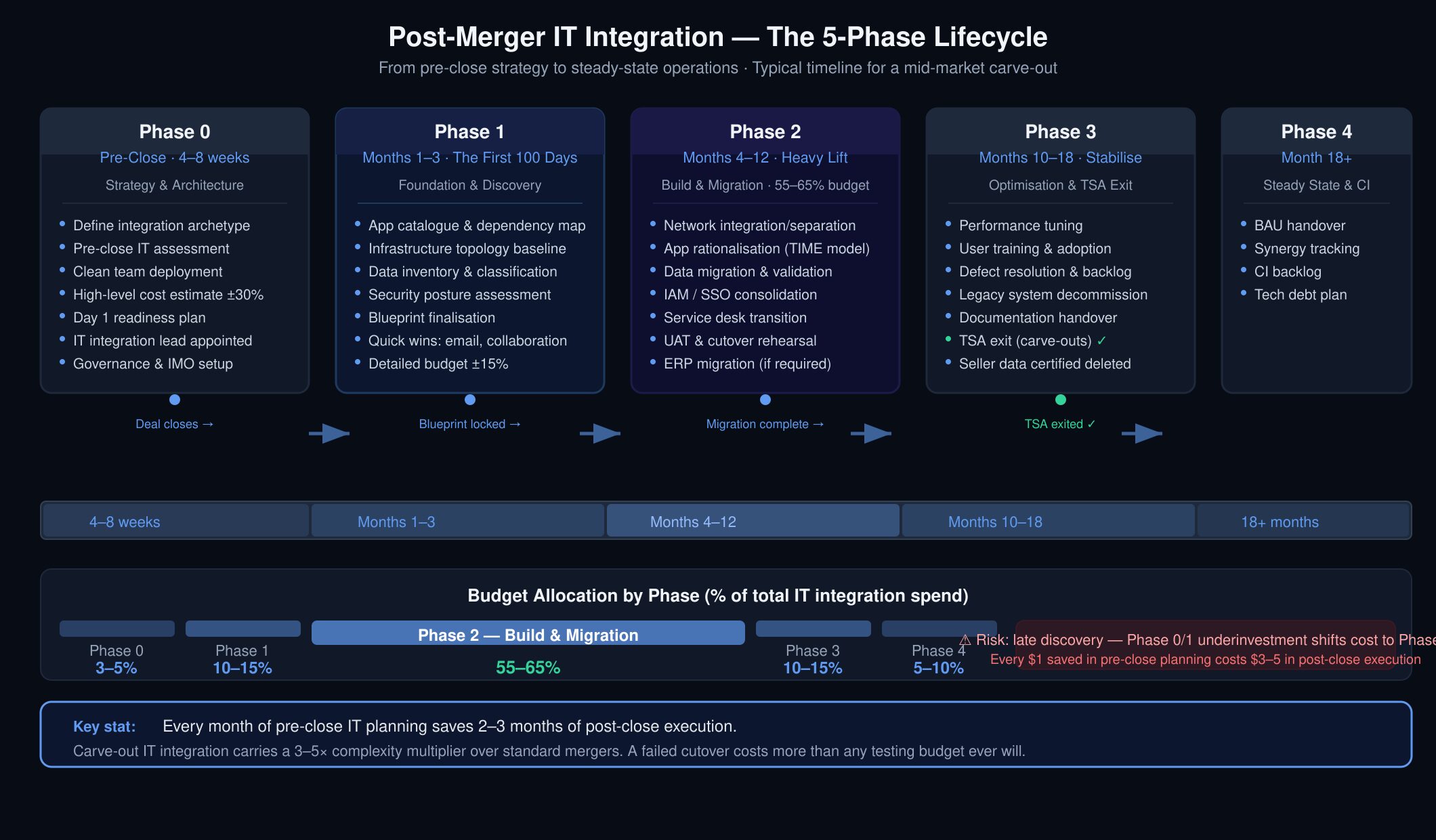
The Post-Merger IT Integration Phases: A Complete Timeline
Successful IT integration follows a structured, phased approach. Here’s the complete lifecycle from pre-close to steady state, with specific timelines, deliverables, and budget allocations for each phase.
Phase 0: Strategy & Architecture (Pre-Close to Close, 4–8 Weeks)
Key deliverables:
- IT integration strategy document (which archetype, which systems to integrate vs. standalone, target end-state architecture)
- High-level cost estimate (±30%)
- IT integration governance structure (who decides what, escalation paths)
- Clean team findings report (for carve-outs)
- Vendor and licence impact assessment
- Day 1 readiness plan (what must work the moment the deal closes)
Critical decisions to make now: What integration archetype are we using? Will the target keep its existing ERP or migrate to ours? What’s our identity and access management strategy? How will we handle email, collaboration, and communication on Day 1? The most expensive sentence in IT integration is “we’ll figure that out after close.”
Phase 1: The First 100 Days — Foundation, Discovery & Quick Wins
Budget allocation: 10–15% of total IT integration budget
Day 1 Readiness (0–48 Hours)
Before the deal closes, you need absolute certainty on what must work from the first minute. Priority checklist for Day 1:
- Email and calendar continuity for all employees
- Network connectivity and internet access
- Identity and access (employees can log in to core systems)
- Payroll and HR systems operational
- Customer-facing systems up (website, support portal, order systems)
- Security baseline active (firewall, endpoint protection, MFA)
The primary success marker for Day 1: zero business disruption coupled with immediate employee reassurance. If people show up and can’t access their email, you’ve already lost momentum that’s expensive to recover.
First 30 Days: Discovery, Inventory & Team Mobilisation
With Day 1 behind you, shift to deep discovery:
- Complete application catalogue with dependencies mapped
- Infrastructure topology mapping (networks, servers, storage, cloud)
- Data classification and volume assessment
- Security posture baseline
- Vendor contract review and renegotiation strategy
- Blueprint refinement based on discovery findings
- IT integration workstreams fully staffed (infrastructure, applications, data, security, service management)
- External partners and system integrators onboarded
- Integration war room and tooling established
Days 31–100: Blueprint Finalisation & Quick Wins
- Lock the scope of integration vs. standalone systems
- Finalise migration sequencing (what moves when)
- Deploy standard collaboration tools across both organisations
- Establish basic connectivity between environments
- Implement interim security controls (MFA, endpoint protection)
- Detailed budget approved (±15%)
Phase 2: Build & Migration (Months 4–12)
Budget allocation: 55–65% of total IT integration budget. This is the heavy lifting phase where most of your budget gets spent.
Infrastructure Build-Out
- Network integration or separation (WAN, LAN, VPN, firewalls)
- Data centre consolidation or cloud migration
- Cloud environment provisioning
- Telephony and communication systems
Application Rationalisation: The TIME Framework
Not every application needs to survive the integration. Use Gartner’s TIME model to categorise every application in the combined estate:
- Tolerate — Keep as-is for now. Business-critical but migration would be too disruptive. Revisit in Phase 4.
- Invest — Strategic applications worth modernising. Allocate resources to improve.
- Migrate — Move to the target platform. The core work of Phase 2.
- Eliminate — Retire. Redundant, unsupported, or duplicate functionality.
Apply TIME in stages, starting with the highest-cost, lowest-value applications. Well-executed application rationalisation can realise millions in annual savings and help offset the capital investment of the merger.
Data Migration: Why 40% of Your Effort Is Cleansing, Not Loading
Data migration is never straightforward. Your CRM has a different data model than theirs. Customer records are duplicated, incomplete, or formatted differently. Transaction data has gaps. Historical data has regulatory retention requirements you didn’t know about.
Plan for this reality: 40% of your data migration effort will be cleansing and transformation, not extraction and loading. Budget for a dedicated data quality workstream and don’t let it get merged into the applications workstream—it’s an entirely different discipline with its own tools, skills, and timeline.
Security Integration
- Identity and access management consolidation
- Single sign-on (SSO) implementation across all environments
- Security monitoring integration (SIEM, EDR)
- Compliance framework alignment (use NIST SP 800-53 as your baseline)
Service Management Transition
- Service desk consolidation or new setup
- ITIL 4 process alignment (incident, problem, change, service request management)
- Vendor management transition
- Support model definition (L1/L2/L3 escalation, regional vs. follow-the-sun)
The ERP question: ERP migration is almost always the longest pole in the tent. If you’re migrating the target from one ERP to another, plan for 9–18 months just for that workstream. Many PE investors choose to keep the target on its existing ERP during the hold period and tackle migration as a pre-exit value creation project rather than a Day 1 integration activity.
Phase 3: Optimisation & Stabilisation (Months 10–18)
Budget allocation: 10–15% of total IT integration budget
- Performance tuning and environment optimisation
- User training and adoption programmes
- Resolving integration defects and backlog items
- Decommissioning legacy and transitional systems
- Documentation and knowledge transfer to BAU teams
- TSA exit (for carve-outs): formal handover from seller’s IT services
TSA Exit: The Critical Milestone for Carve-Outs
If you’re operating under a TSA, Phase 3 ends with TSA exit. This is a hard deadline with real financial consequences. Miss it? Extension costs typically run $50K–$200K per month depending on the services involved. Worse, extensions damage your relationship with the seller and may trigger renegotiation of other deal terms.
TSA exit checklist — this feeds directly into signing readiness and Day-1 planning, where the exit dates are locked into the deal timetable:
- All applications migrated or replaced with signed-off acceptance
- Data fully extracted from seller environments
- Network connectivity severed (except any agreed residual links)
- New support contracts in place
- User access to seller systems revoked
- Seller data certified as deleted (critical for GDPR compliance)
- Business continuity testing completed on standalone environment
- Backup and disaster recovery operational
Phase 4: Steady State & Continuous Improvement (Month 18+)
Budget allocation: 5–10% of total IT integration budget
- Transition IT operations to BAU teams with clear handover documentation
- Implement continuous improvement programme with quarterly review cadence
- Track synergy realisation against business case
- Address residual technical debt documented during migration
- Plan next-phase technology investments aligned with hold-period strategy
The Carve-Out IT Separation Playbook
If you’re a PE firm executing a corporate carve-out, the IT workstream is fundamentally different from a standard merger integration. You’re not combining—you’re replicating and separating. Here’s how to approach it.
The TSA: Your Ticking Clock and How to Negotiate It
The Transitional Service Agreement is the legal contract under which the seller continues to provide IT services after close. Get this wrong and the entire integration is compromised before it begins.
Duration: Push for 18–24 months. Less than 12 months is aggressive for any carve-out involving ERP separation. More than 24 months signals to the seller that you’re not serious about independence.
Service scope: Define exactly what the seller will continue to provide—ERP access, network hosting, help desk, application maintenance, security operations. Ambiguity here creates disputes later.
Pricing: Typically cost-plus. Verify the cost base—sellers sometimes inflate “cost” to make extensions more expensive. Negotiate a fixed schedule of declining fees to incentivise timely exit.
Exit provisions: Define what “exit” means for each service. For example: “ERP services are considered exited when the buyer has successfully migrated all financial data to their target ERP and processed one full month-end close on the new system.”
Data deletion: Require seller certification of data deletion from all systems upon exit. This is frequently overlooked and has significant GDPR/regulatory implications.
The Separation Technology Stack: What You Need to Build or Buy
For a typical mid-market carve-out, here’s what you’ll need to stand up independently, with realistic timelines:
| Component | Options | Typical Timeline |
|---|---|---|
| ERP | Stand up new instance, migrate data from parent, or adopt cloud ERP | 9–18 months |
| Active Directory / IAM | New forest + trust relationship during migration, then sever | 3–6 months |
| Network | New WAN, firewalls, VPN (often SD-WAN for speed) | 3–6 months |
| Email & Collaboration | M365 tenant or Google Workspace (cloud = faster) | 2–4 months |
| Endpoint Management | Intune, JAMF, or equivalent (rebuild device fleet or re-enrol) | 3–6 months |
| Data Warehouse / Analytics | Extract from parent, build new reporting environment | 6–12 months |
| Security Operations | SIEM, EDR, SOC (either build or outsource) | 3–6 months |
| Service Desk / ITSM | New instance or outsourced | 2–4 months |
Lift and Shift vs. Greenfield vs. Hybrid: How to Decide
One of the earliest and most consequential carve-out decisions: do you replicate the target’s existing IT environment as closely as possible, or use the separation as an opportunity to modernise?
- Lift and shift: Faster, lower risk, more predictable. But you inherit all existing technical debt. Best when the TSA window is tight, the existing stack is modern enough, and the business can’t absorb change on top of separation.
- Greenfield: Build new, modern systems from scratch. Higher upfront investment and more change management, but you exit the TSA with a clean, future-proof technology estate. Best when the existing stack is significantly outdated and the business has appetite for transformation.
- Hybrid (most common in practice): Lift and shift for core systems (ERP, manufacturing, operations) where business continuity is paramount. Greenfield for commoditised services (email, collaboration, endpoint management) where modern cloud options are faster and cheaper than replicating legacy.
Carve-Out Cost Benchmarks: What IT Separation Actually Costs
Based on analysis of 50+ mid-market carve-outs (£20M–£500M EV), with data validated against BCG’s 2024 carve-out benchmarking study:
| Carve-Out Complexity | IT Separation Cost (% of deal value) | Typical Timeline |
|---|---|---|
| Simple (few shared systems, modern stack, small IT footprint) | 1–2% | 9–12 months |
| Moderate (shared ERP, some legacy, medium IT team) | 2–4% | 12–18 months |
| Complex (heavily integrated ERP, legacy systems, large IT footprint, multi-geography) | 4–7% | 18–24+ months |
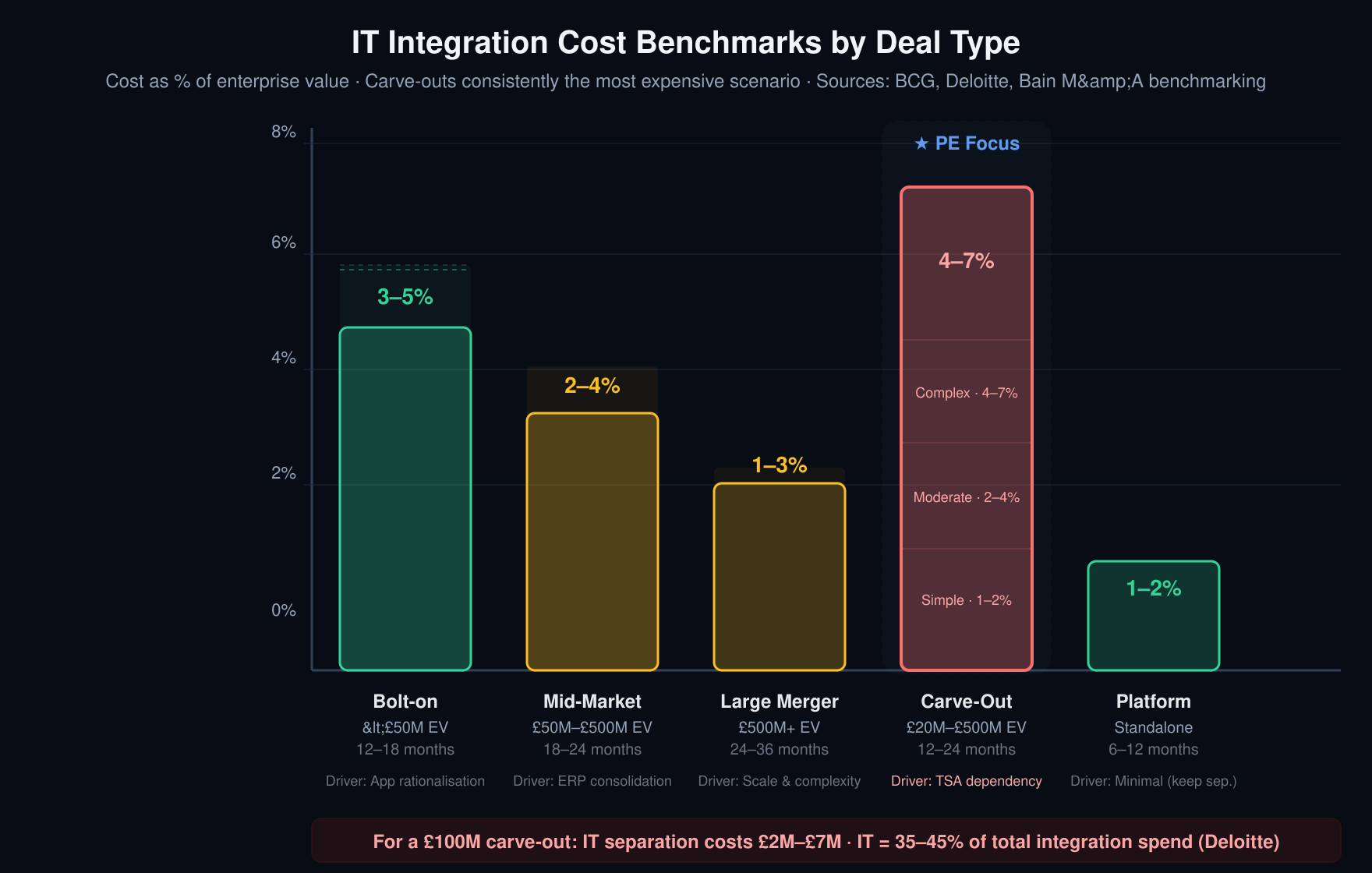
For a £100M carve-out, IT separation will cost £2M–£7M and take 12–24 months. IT represents 35–45% of total integration spend for carve-out transactions (Deloitte M&A Integration Cost Survey). Factor this into your deal model before signing—not after the TSA clock has started.
Five Warning Signs Your Carve-Out IT Separation Is Going Off Track
- Month 3 and you’re still discovering shared dependencies. Your clean team didn’t go deep enough. Every new discovery after this point adds weeks to the timeline and money to the budget.
- The TSA extension conversation starts before Month 12. Your original timeline was unrealistic. Extensions cost $50K–$200K/month and signal to the seller that you underestimated the complexity.
- Key business users say “the old system was better.” You didn’t invest enough in change management and user training. Technical success without user adoption is still a failure.
- ERP migration budget has doubled. You underestimated data complexity. This is the most common cost overrun in carve-out IT separation and it’s almost entirely avoidable with better pre-close data profiling.
- The seller is frustrated. Your separation is affecting their business operations. A frustrated seller becomes uncooperative, and cooperation is essential when you’re still dependent on their systems and people.
Building Your IT Integration Team
Core Team Structure
A successful IT integration requires a dedicated programme structure, not a dotted-line to the IMO. Here’s the recommended org chart:
| Role | Reports To | Key Responsibilities |
|---|---|---|
| IT Integration Lead | IMO Lead | Overall IT integration programme, budget, governance, C-level reporting |
| Infrastructure Workstream Lead | IT Integration Lead | Networks, data centres, cloud, endpoints, telephony |
| Applications Workstream Lead | IT Integration Lead | ERP, CRM, HRIS, proprietary apps, integration middleware |
| Data Workstream Lead | IT Integration Lead | Data profiling, cleansing, migration, validation, archival |
| Security Workstream Lead | IT Integration Lead | IAM, SSO, SIEM, compliance, security monitoring |
| Service Management Lead | IT Integration Lead | Service desk, ITSM, ITIL processes, vendor management |
| Testing & QA Lead | IT Integration Lead | Integration testing, UAT, performance testing, cutover rehearsal |
| Change Management Lead | IT Integration Lead | User training, communication, adoption tracking |
Build vs. Buy: Internal, System Integrator, or Boutique Specialist?
Most mid-market organisations don’t have an IT integration team sitting idle. Your options:
- Internal team: Cheaper day rate but they have day jobs, probably lack M&A experience, and integration pace will compete with BAU priorities. Works only for simple integrations with generous timelines.
- System integrator (SI): The traditional approach. Accenture, Deloitte, Wipro bring methodology and capacity. Drawbacks: expensive ($1,200–$2,500/day), often overstaffed with junior resources, and can become dependent on your internal team for decisions.
- Boutique M&A IT specialist: Firms dedicated to M&A IT integration. More senior teams, faster pace, better value. Typically $900–$1,800/day. Best fit for mid-market deals where you need expertise but can’t justify Big 4 rates.
Recommended for most PE deals: Internal IT lead + boutique M&A specialist for architecture and workstream leads + tactical contractors for execution + SI only for commodity work (desktop migration, network build). Bain & Company’s 2023 study found hybrid resourcing achieved integration milestones 30% faster than either fully internal or fully outsourced models.
Retaining the Target’s IT Team: Your Most Valuable Integration Asset
In many deals, especially carve-outs, the target’s IT team is the single most valuable integration asset. They know where the bodies are buried. But they’re also the most likely to leave during the uncertainty of an integration.
Retention strategy:
- Identify the 3–5 critical IT people during due diligence, not after close
- Have retention agreements in place before close—don’t wait for them to get nervous
- Give them meaningful roles in the integration programme, not just “keep the lights on”
- Over-communicate: uncertainty is the enemy of retention
- Consider stay bonuses tied to integration milestones (TSA exit, ERP migration completion)
The IT Integration War Room: Tools, Cadence, and Governance
Every IT integration needs a physical or virtual war room where all workstreams are visible, blockers are surfaced immediately, and decisions happen in hours, not weeks. Minimum setup:
- Daily standup: 15 minutes, all workstream leads, what moved yesterday, what moves today, what’s blocked
- Weekly steering committee: IT Integration Lead + IMO Lead + sponsor, budget/risk/escalation decisions
- Shared dashboard: RAG status per workstream, milestone burndown, budget vs. actual, top 5 risks
- Issue log: Single source of truth for every integration defect, blocker, and decision, with owner and ETA
Post-Merger IT Integration: Cost and Timeline Benchmarks
Cost Benchmarks by Deal Type
| Deal Type | IT Integration Cost (% of EV) | Typical Duration | Key Cost Driver |
|---|---|---|---|
| Bolt-on (<£50M EV) | 3–5% | 12–18 months | Application rationalisation |
| Mid-market merger (£50M–£500M) | 2–4% | 18–24 months | ERP consolidation |
| Large merger (£500M+) | 1–3% | 24–36 months | Scale and complexity |
| Carve-out (£20M–£500M) | 3–7% | 12–24 months | Separation and TSA dependency |
| Platform acquisition (standalone) | 1–2% | 6–12 months | Minimal (keep separate) |
Cost Breakdown by Workstream (% of Total IT Integration Budget)
| Workstream | Typical % of Budget |
|---|---|
| Infrastructure (network, data centre, cloud) | 20–25% |
| Applications (ERP, CRM, migration/licensing) | 30–35% |
| Data (migration, cleansing, validation) | 15–20% |
| Security (IAM, compliance, monitoring) | 10–15% |
| Service Management (ITSM, service desk) | 5–10% |
| Programme Management & Governance | 10–15% |
| Change Management & Training | 5–10% |
The Five Hidden Costs Nobody Budgets For
1. Licence true-up. When you separate from a parent’s enterprise agreement, your per-unit licence costs can increase 2–3x. Budget £100K–£500K+ for mid-market deals.
2. Integration-induced outages. Every migration carries downtime risk. For a £50M-revenue business, one day of ERP unavailability can cost £200K+ in disrupted operations. Budget for redundancy during cutover.
3. Shadow IT discovery. You’ll find applications and services the target didn’t know they had or didn’t disclose. Budget 10–15% contingency specifically for shadow IT remediation.
4. Data centre exit fees. If you’re moving out of a shared data centre, early termination or migration fees can be substantial. Review all hosting contracts during diligence.
5. Vendor professional services. Software vendors charge premium rates for “migration assistance,” and you often have no choice but to buy it. Budget £50K–£200K per major platform (ERP, CRM, HRIS).
10 Common IT Integration Mistakes (and How to Avoid Them)
1. “We’ll Just Migrate Everything to Our ERP”
Forcing a target onto your ERP because “it’s our standard” ignores the reality that ERP migrations are 9–18 month projects with significant business risk. Unless there’s a compelling value case for immediate ERP consolidation, keep the target on their existing ERP and tackle migration as a separate programme.
2. “IT Is Just Another Workstream”
IT is not one workstream. It’s 5–7 distinct workstreams with deep interdependencies. Treating it as a single line item in the IMO structure guarantees coordination failures. Give IT integration its own programme structure with a dedicated lead who reports to the IMO but has authority over IT workstream decisions.
3. “The Business Will Tell Us What They Need”
The business rarely understands what’s technically feasible, what dependencies exist, or what realistic timelines look like. Their requests (“can we have the new CRM by next month?”) often ignore the infrastructure, data, and security groundwork required. Run joint business-IT workshops early. Translate business requirements into technical specifications with clear lead times.
4. “We Don’t Need a Dedicated Testing Environment”
Testing in production—or in a half-built test environment—is the fastest route to an integration outage that makes it into the board report. Yet testing budgets are often the first thing cut when timelines compress. Build and fund a proper testing environment. Include integration testing, UAT, performance testing, and a full dress rehearsal of cutover before go-live.
5. “The Data Migration Will Be Straightforward”
It never is. Your CRM has a different data model than theirs. Customer records are duplicated, incomplete, or formatted differently. Transaction data has gaps. Historical data has regulatory retention requirements. Start data profiling during diligence. Assume 40% of your effort will be cleansing, not loading.
6. “We’ll Handle Security at the End”
Security treated as an afterthought leads to temporary admin accounts that become permanent, firewall rules that are “just for now” and never cleaned up, and an integration environment that’s an attacker’s dream. Security is a Day 1 workstream, not a Phase 3 afterthought. The security lead should have veto power over go-live decisions.
7. “We’ll Figure Out Licensing After Close”
Software licensing is one of the largest and least-understood costs in IT integration. When you separate from a parent company’s enterprise agreement, per-unit costs jump. When you consolidate onto one platform, you may be paying for licences you can’t cancel. Map every licence agreement during due diligence and build the post-deal licensing model before close.
8. “Shadow IT Isn’t a Real Problem”
Shadow IT—applications and services procured by business units outside IT’s control—is pervasive, especially in mid-market companies. During integration, these unofficial systems surface at the worst possible moments, creating unexpected dependencies and compliance gaps. Budget 10–15% contingency specifically for shadow IT discovery and remediation.
9. “Our Internal Team Can Handle This Alongside BAU”
Your IT team already has a full-time job running the business. Adding a complex integration programme on top guarantees that both will suffer. The integration team needs dedicated resources—either internal staff backfilled from their BAU roles or external specialists brought in specifically for the programme.
10. “The TSA Extension Won’t Cost Much”
TSA extensions are rarely just the monthly fee. They damage seller relationships, may trigger renegotiation of other deal terms, delay synergy realisation, and signal to the market that the integration is struggling. At $50K–$200K per month, a six-month extension on a mid-market deal can burn $1M+ in pure cost, before accounting for the opportunity cost of delayed synergies.
How AssetMax Supports Post-Merger IT Integration
At AssetMax, we built CarveX specifically for the hardest IT integration scenario: the corporate carve-out. But the technology and methodology apply to any post-merger IT integration where speed, precision, and risk reduction matter.
What CarveX Delivers
- Rapid IT landscape mapping: In 5–10 days, produce a complete inventory of the target’s applications, infrastructure, data assets, and security posture—including shadow IT that standard diligence misses. This alone typically saves 4–8 weeks of post-close discovery.
- TSA dependency analysis: Identify every shared service, inter-system dependency, and vendor relationship that needs to be unwound—before you sign the TSA, not after.
- Separation cost modelling: Benchmarks across 200+ carve-outs give you reliable cost estimates, not consultant guesswork padded with 50% contingency.
- Migration sequencing engine: Model the optimal sequence of IT migration activities to minimise business disruption and TSA duration, accounting for real-world dependencies that spreadsheet-based plans miss.
How Diligize Strengthens Pre-Close Planning
Diligize, our technology due diligence product, ensures the pre-close assessment isn’t a box-checking exercise. It delivers independent, data-driven analysis of the target’s technology estate—technical debt quantification, architecture risk scoring, cyber vulnerability assessment, and vendor contract analysis—all within 5–10 days. The findings feed directly into deal terms, integration budget, and the separation plan.
How Praetorian Protects During Integration
Praetorian provides continuous cybersecurity monitoring throughout the integration period. When networks, identities, and access controls are in flux, security gaps inevitably emerge. Praetorian detects them before they become incidents—monitoring for misconfigurations, unauthorised access, and compliance drift across both environments during the transition.
Measurable Impact for PE Investors
- 30–50% faster TSA exit — because dependencies are identified and resolved before they become surprises
- 15–25% lower separation costs — because cost models are based on real data, not worst-case assumptions
- Fewer Day 1 surprises — because pre-close IT assessment catches what standard financial due diligence misses
Key Takeaways
- Start before close. Every month of pre-close IT planning saves 2–3 months of post-close execution. Appoint your IT integration lead at signing, not after.
- Treat IT as a programme, not a workstream. IT integration touches infrastructure, applications, data, security, service management, and people—each needs its own workstream lead, budget, and timeline.
- Carve-outs are 3–5x harder than mergers. Plan for 12–24 months, budget 3–7% of deal value for IT separation, and negotiate a TSA that gives you runway, not pressure.
- ERP migration can wait. Network, identity, email, and security are Day 1 priorities. ERP consolidation is a hold-period value creation project.
- Data is always harder than you think. Dedicate a separate workstream to data profiling, cleansing, migration, and validation. Budget 40% of the data effort for cleansing alone.
- Security is not optional or deferrable. Integrate security from Day 1. Give your security lead veto power over go-live decisions.
- Your TSA is your lifeline—and your constraint. For carve-outs, the TSA determines everything: budget, timeline, architecture choices. Invest the time to negotiate it properly before close.
- The target’s IT team is your secret weapon. Retain them, empower them, and give them meaningful roles in the integration. Their knowledge is irreplaceable.
- Test everything. Then test again. A failed cutover costs more in reputation damage and business disruption than any testing budget ever will.
- Technology is the enabler; people make it work. The best IT integration plan will fail without change management, communication, and user adoption. Fund these workstreams properly.
Frequently Asked Questions
What is post-merger IT integration?
Post-merger IT integration (PMI IT) is the process of combining or separating the technology estates of two organisations following a merger or acquisition. It covers infrastructure (networks, data centres, cloud), applications (ERP, CRM, HRIS), data migration, security (identity, access, compliance), and service management—all coordinated to minimise business disruption while realising the deal’s value thesis.
How long does post-merger IT integration take?
For standard bolt-on acquisitions: 12–18 months. For mid-market mergers: 18–24 months. For carve-outs: 12–24 months depending on complexity. Large enterprise mergers can take 24–36 months. The single biggest variable is whether ERP migration is required—this alone adds 9–18 months.
How much does post-merger IT integration cost?
IT integration typically costs 1–7% of deal value depending on deal type and complexity. Bolt-ons: 3–5%. Mid-market mergers: 2–4%. Carve-outs: 3–7%. IT represents 25–40% of total integration costs across all workstreams.
What is a TSA in M&A and why does it matter for IT integration?
A Transitional Service Agreement (TSA) is a contract under which the seller continues to provide IT services to the carved-out entity after the deal closes. It typically runs 6–24 months and costs the buyer a negotiated monthly fee. The TSA is the critical path for carve-out IT separation—every month of delay costs money and erodes seller goodwill.
What’s the difference between IT integration for a merger vs. a carve-out?
In a merger, you’re combining two IT estates into one—a consolidation exercise. In a carve-out, you’re surgically extracting one IT estate from a shared parent environment—a replication and separation exercise. Carve-outs are 3–5x more complex because everything (ERP, AD, network, data) is typically shared with the parent and must be rebuilt standalone.
Should we migrate the target’s ERP immediately after close?
Generally, no. ERP migration is a 9–18 month project with significant business risk. Unless there’s a compelling value case for immediate consolidation, keep the target on their existing ERP and tackle migration as a hold-period value creation project. Day 1 priorities are network, identity, email, and security—not ERP.
Who should lead the IT integration workstream?
The IT integration lead should be appointed at signing (before close), have deep understanding of both technology architecture and business operations, authority to make binding decisions about architecture and budget, and ideally prior M&A integration experience. They should report to the IMO lead but have autonomy over IT workstream decisions.
What is a clean team and when do you need one?
A clean team is a small group of IT architects and external advisors who can access detailed seller IT data during the pre-close period that would normally be off-limits for competitive reasons. You need one for any carve-out where the target’s systems are shared with the parent. A clean team that starts 60 days before close can save 6+ months of post-close integration time.
What are the most common IT integration mistakes?
The top mistakes are: treating IT as a post-close problem, assuming data migration equals integration, underestimating complexity at close, losing key IT talent during the transition, underfunding testing, deferring security to later phases, ignoring shadow IT, and negotiating unrealistic TSA timelines for carve-outs.
What are the stages of post-merger integration?
IT integration runs through five stages that mirror the deal itself: pre-close diligence and separation planning (signing to close), the first 100 days (stabilisation, team formation, quick wins), build and migration (month 4 to 12, the heavy lifting of ERP and data), stabilisation (month 10 to 18, when parallel running ends), and steady state (month 18 onward, where the run cost actually lands). Each stage has its own decision rights and its own failure mode. Skipping the pre-close stage is the most expensive version of skipping, because every day after signing removes a negotiation lever you can never get back.
How do you build a post-merger integration plan?
A workable post-merger integration plan starts with the value thesis, not the org chart. Work backwards: which three or four operational outcomes justify the price paid, which systems carry those outcomes, and what must be true on day one for each. From there you sequence by dependency, not by ambition. The plan needs a named owner per workstream, a budget line per workstream, and a decision date for every TSA exit. Plans that list activities without owners and funding dates are the ones that slip, every time.
What are the most common post-merger integration challenges?
The recurring ones are rarely technical. Identity and access merging across two directory structures, licence true-ups when two enterprise agreements collapse into one, data ownership arguments between the two legacy IT teams, and change fatigue in the acquired workforce. Then the quieter one: nobody funds the run-cost increase that arrives at month 18, so the synergy case quietly inverts. Most of these are visible during diligence if you ask for the right artefacts.
How can AI and automation accelerate IT integration?
AI-powered tools can accelerate multiple phases: automated application discovery and dependency mapping (replacing weeks of manual inventory), intelligent data profiling and cleansing (reducing migration errors), AI-assisted code analysis for technical debt assessment, and continuous security monitoring during the transition. Platforms like AssetMax’s CarveX use AI to map IT landscapes in days, model separation costs from real benchmarks, and sequence migrations optimally—reducing TSA duration by 30–50%.
This guide was produced by the AssetMax research team, drawing on practitioner experience across 200+ carve-out and M&A IT integration transactions, combined with analysis of published research from McKinsey, BCG, Bain & Company, Deloitte, and Gartner. AssetMax is the AI-powered platform for private equity and M&A professionals. Our products—CarveX, Diligize, Praetorian, Kepler, Copernicus, ExitSmart, and Galileo—support the full investment lifecycle from deal sourcing through exit readiness.
The cost benchmarks and timelines presented in this guide are based on analysis of 50+ mid-market carve-out transactions (£20M–£500M EV) completed between 2019 and 2025, supplemented by published benchmarking data from BCG, Deloitte, and Bain & Company. Individual deal outcomes vary significantly based on deal structure, geography, technology complexity, and team capability.
Ready to accelerate your next IT integration? Learn more about CarveX or contact our team to discuss your integration requirements.